

Introduction
One of the most important and most frequently overlooked topics in IT planning is cost, specifically how to pay for exactly what you need and nothing more. The subject touches many adjacent concerns like system resilience and availability, information security, and operational performance. This article presents practical perspectives that will help organizations plan their IT and communications infrastructure more efficiently and cost-effectively, with a particular focus on data networks.
| Note on examples
All examples in this article are drawn from real projects from the last ten years. Identifying details have been omitted or lightly modified where necessary, without affecting the core point being illustrated. |
Plan for What You Need. Not for What You’re Being Sold
The most common and costly mistake in IT procurement is buying a solution designed around a vendor’s portfolio rather than the organization’s actual requirements. The following real-world cases illustrate how dramatically this can inflate costs.
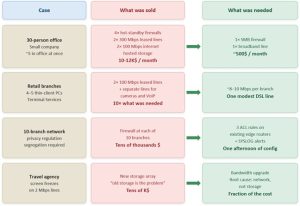
Figure 1: What was sold versus what was needed, four real-world cases
Case 1: The 12,000$-per-Month Office of 30 People
| Case study: Over-engineered connectivity for a small office
A small Tel Aviv company, with approximately 30 employees, most working remotely, with no more than five people in the office at any one time, was paying over 10,000$ per month in communications costs and couldn’t understand why. Investigation revealed: two on-premises firewalls in hot-standby, two additional firewalls at the ISP in hot-standby, two 300 Mbps leased lines, hosted storage, and two symmetric 100 Mbps internet connections. Total: 10-12K$/month. The actual requirement: a basic internet connection and a simple firewall, under 500$/month. A saving of over 90%. |
Case 2: 100 Mbps Leased Lines for Terminal Sessions
| Case study: Bandwidth massively over-provisioned for thin clients
A large retail chain purchased two 100 Mbps leased lines per branch. Each branch had 4–5 thin-client computers (Microsoft Terminal Services). Actual peak bandwidth per branch: 7–8 Mbps. The provisioned bandwidth was more than ten times the real requirement. IP cameras and VoIP were connected on separate lines, meaning the over-provisioned leased lines weren’t even carrying full load. |
Case 3: Firewalls for Network Segregation — When ACLs Would Do
| Case study: Compliance requirement solved with router ACLs
A client with ten branches was told they needed firewalls at each site to comply with data privacy regulations requiring network segregation. After reviewing the actual regulatory text, the requirement was met with three simple ACL rules on the existing edge routers, plus SYSLOG alerting ACL violations. Saving: tens of thousands of dollars. Implementation: one afternoon of configuration work. |
Case 4: Blaming Storage for a Bandwidth Problem
| Case study: Wrong diagnosis, expensive non-solution
A travel agency with branch offices on 2 Mbps lines used Microsoft Terminal Services. Screens freeze frequently, especially with images or videos. The vendor’s diagnosis: ‘The storage array is old, that’s the problem.’ Proposed solution: new storage costing tens of thousands of dollars. The actual problem: insufficient bandwidth. The storage investment resolved nothing. The correct solution would have been a bandwidth upgrade at a fraction of the cost. |
| ✓ The lesson from all four cases
Before spending money, diagnose correctly. Get a second opinion. Compare multiple vendors. Apply common sense. In every case above, the root cause was misdiagnosis, over-specification, or a vendor incentivized to sell more than was needed. |
Planning – The Foundation of Cost Control
Good IT planning addresses four interconnected dimensions: application performance, system resilience and availability, information security, and cost. Decisions in one area directly affect the others.
1. Application Performance
Applications must work fast. When users experience unreasonable delays, freezes on Zoom or Teams calls, thirty-second document saves, or unexpected disconnections, something is wrong. The critical question is: what exactly?
From experience, performance problems follow this distribution:
- Application-layer issues (bugs, poor query design, missing indexes, misconfigured caching) are the most common cause
- Hardware issues (underpowered servers, slow storage, memory pressure)
- Network issues (insufficient bandwidth, high latency, packet loss) are the least common cause, but the first blamed
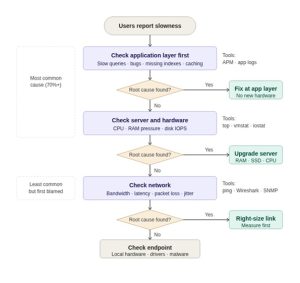
Figure 2: Performance diagnostic flow — always check the application layer first
| ⚠ Don’t assume it’s the network
More bandwidth, faster servers, or a new cloud service will not fix an application bug or a missing database index. Before spending money on infrastructure, invest in proper root-cause analysis. Upgrading the wrong layer is expensive and solves nothing. |
2. Resilience and Availability – Plan Proportionally
Resilience is a risk management exercise, not a checkbox. The right level of availability depends on the cost of downtime to the business — not on what the vendor proposes.
- Retail store with a few POS terminals: a DSL line with 4G cellular backup, under 20$/month via IPVPN, is entirely sufficient.
- Software development company connected to a remote data center: idle developers are very expensive. Dual links from different ISPs, plus an internet fallback, plus redundant on-premises equipment, all justified.
Consider the following availability tiers and their related costs:
| Availability level | Recovery time | Typical implementation | Relative cost |
| Cold standby server | Hours | Spare server, powered off, restored from backup | X |
| Warm standby server | < 1 hour | Server pre-loaded with software, data synced periodically | ~2X |
| Hot standby / HA cluster | Minutes | Active-Passive cluster, automatic failover | ~3 to 4X |
| Full redundancy + DR site | Always on | Active-Active, geographically separated, real-time sync | 5X+ |
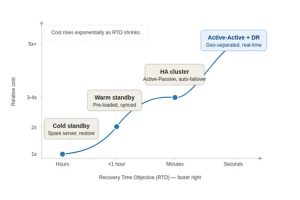
Figure 3: Cost rises exponentially as recovery time decreases — match the tier to your business need
Do not pay for availability you do not need. If the business can absorb several hours of downtime, the 1X tier is the right answer.
3. Bandwidth: Measure, Don’t Guess
Bandwidth is consistently over-provisioned because it is sold rather than measured. Before signing a connectivity contract:
- Measure actual peak and average bandwidth consumption using SNMP polling or NetFlow/sFlow analysis
- Apply a realistic growth factor (12–24 months of projected growth)
- Add headroom for burst traffic, but base it on measured peaks, not vendor estimates
- Consider whether asymmetric bandwidth meets the use case before purchasing a symmetric line, which can at least double or even triple the cost.
| The symmetric vs. asymmetric myth
A 100 Mbps symmetric leased line and a 100 Mbps VDSL download connection will deliver identical application performance for most workloads, browsing, cloud services, SaaS, VoIP. The leased line (Carrier Ethernet or MPLS) offers symmetry and an SLA, worth paying for when upload throughput matters or when contractual uptime guarantees are required. Otherwise, don’t. WDM services offer lower latency over standard Ethernet/MPLS lines. In practice, this difference is imperceptible to applications and users in most cases. WDM costs several times more for the same bandwidth. Do you really need it? |
Information Security: Right-Sized, Not Over-Engineered
Information security is non-negotiable, but the appropriate level of investment varies enormously by organization size, regulatory environment, threat model, and operational complexity. Expensive does not mean appropriate.
Firewalls: Match the License to the Use Case
Firewall costs are driven primarily by licensing, not hardware. Purchasing the wrong license tier is one of the most common sources of unnecessary security spending.
Example: a small-to-medium organization with a few hundred users, a 200–300 Mbps internet connection, and no complex inspection requirements can be fully protected by an entry-level UTM appliance (such as a Check Point 1555 or equivalent) at approximately $1,500. There is no technical justification for a $30,000 enterprise appliance in this scenario.
- Traffic profiling: if steady-state traffic is 1 Gbps but spikes to 5 Gbps twice daily during backup, examine whether backup traffic requires deep inspection. If not, route it around the firewall. Right-size FW for traffic that actually needs inspection.
| FW use case | License complexity | Key consideration |
| Data center protection (DC-FW) | Low | Internal traffic only; no URL filtering or remote access needed |
| Internet perimeter (Perimeter FW) | Medium–High | Requires UTM: IPS, URL filtering, anti-malware, SSL inspection |
| Remote access (VPN) | Medium | User licensing by concurrent sessions or named users |
| Active-Active HA | High | Full license on both nodes; significantly more expensive than Active-Passive |
| Active-Passive HA | Medium | Standby node often requires only a standby license, sufficient for most organizations |
| ✓ Match the license to the actual use case
Active-Passive HA is sufficient for most organizations and costs significantly less than Active-Active. DC firewalls protecting internal server-to-server traffic need far simpler licenses than perimeter firewalls handling internet egress with full UTM inspection. |
Endpoint Protection (EDR/XDR): Audit Before You Buy
| Case study: $190,000 saved by auditing existing licenses
A client with approximately 1,000 endpoints was evaluating a new EDR/XDR solution at $20/endpoint/month, an annual cost of approximately $190,000. A feature matrix was built that required EDR capabilities vs. security products already purchased (and mostly not deployed) by the organization. Result: most required features were already available for existing, paid-for products. They had simply never been enabled or configured. The $190,000 investment became a configuration project, a fraction of the cost. |
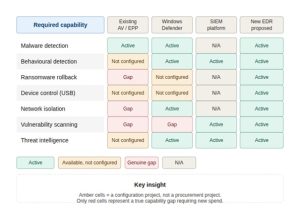
Figure 4: EDR feature audit matrix — amber cells are a configuration project, not a procurement project
| ✓ Audit your existing security estate before purchasing new products
Before evaluating any new security product, map what you already have against what you need. • Build a feature requirements matrix (rows = required capabilities, columns = existing products). • Check which features are licensed but not deployed. • In many organizations, 60–80% of required security capabilities are already purchased — just not implemented. |
Segmentation, Micro-Segmentation, and NAC
Network segmentation, that is, dividing the network into zones with controlled traffic between them, is a sound security principle. The cost of implementing it varies by several orders of magnitude depending on the method chosen.
| Method | Cost | Complexity | Best for |
| VLANs only | Negligible | Low | Basic isolation; traffic separation without access control |
| ACLs on routers / switches | Negligible | Low–Medium | Rule-based traffic filtering; compliance with minimal spend |
| Internal FW (DC-FW) | Medium | Medium | Strict zone enforcement; full logging; regulated environments |
| Micro-segmentation platform | Very High | Very High | Large enterprises with advanced threat detection requirements |
| NAC (Network Access Control) | High | High | Device authentication; 802.1X enforcement; BYOD environments |
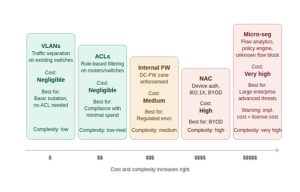
Figure 5: Network segmentation methods – cost and complexity spectrum
| ⚠ Micro-segmentation and NAC: proceed with caution
These are powerful but carry significant implementation risks. • Implementation is complex, time-consuming, and expensive, often costing as much as or more than the license itself. • Partially deployed NAC or micro-segmentation may provide a false sense of security while creating operational disruption. • Always require the vendor to include full implementation (with a customer-defined test plan) in the quoted price. |
Budget Planning and Risk Management
Don’t Buy Features You Won’t Use
Network switches provide a useful illustration. The silicon in a data-center switch may support several thousand features. The switch OS exposes a few hundred. In a typical deployment, a few dozen are used.
Paying a premium for feature depth that will never be exercised is a waste. What matters in a production switch is reliability, vendor support quality, and fit with the features you use.
The Complexity Trap
There is a persistent tendency to gravitate toward the most feature-rich product in each category. In practice, the most advanced product is frequently also the most complex, and complexity is the enemy of reliability.
- A sophisticated management platform that became shelfware within six months
- A security appliance that was installed but never properly configuredת, providing zero actual protection
- A next-generation system that required months of professional services to stabilize
| ⚠ Complexity kills deployments
A simpler solution that is fully deployed and correctly configured will always outperform a sophisticated solution that is partially deployed or misconfigured. Weight operational simplicity as a first-class requirement alongside feature coverage. |
Security Costs Must Be Proportional
Good security results from planning against the organization’s real threat model and real compliance requirements, not against a vendor’s sales narrative.
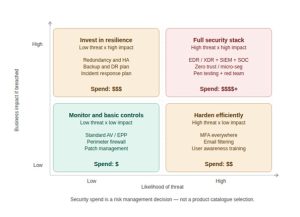
Figure 6: Security investment framework, match spend to your actual risk quadrant
- Match security spends to the sensitivity and regulatory classification of the data being protected
- Consider the organization’s size and the realistic threat landscape it faces
- Ensure operational capacity exists to manage and maintain whatever is deployed
Spending on security to “feel safe” without a clear threat model or compliance driver produces neither real security nor cost efficiency. It produces complexity, shelfware, and a false sense of protection.
Practical Cost-Reduction Checklist
Before authorizing any significant IT or communications expenditure:
- Measure don’t estimate. Instrument the existing environment. Answers based on measurement are always cheaper than answers based on vendor estimates.
- Diagnose before prescribing. Identify the root cause before evaluating solutions. A performance problem is not automatically a network problem.
- Audit existing licenses and deployments. Map current products against requirements. What is licensed but not deployed? Activating existing capabilities is almost always cheaper than buying new ones.
- Get 3-4 competitive quotes. Competitive pressure helps. Quotes also reveal the market range and make outliers visible.
- Read the regulatory text yourself. Compliance requirements are often interpreted more broadly than necessary by vendors with a product to sell.
- Require implementation to be included in pricing. For any complex solution, demand that full implementation, with a customer-defined acceptance test plan, be included in the quoted price.
- Apply proportionality. Match the solution to the organization’s size, risk profile, and operational capacity.
- Consult independently. An independent technical consultant costs far less than a procurement mistake.
Summary
IT and communications costs are consistently higher than they need to be — not because the technology is inherently expensive, but because procurement decisions are often made without proper planning, measurement, or independent validation.
- Define what you need before talking to vendors
- Measure the existing environment rather than accepting vendor estimates
- Diagnose the root cause of problems before purchasing solutions
- Audit existing licenses before buying new products
- Apply proportionality, match the solution to real risk and real scale
- Get competitive quotes and independent advice
- Apply common sense: if something seems like too much, it probably is
The examples in this article span connectivity, firewalls, endpoint protection, segmentation, and server resilience, but they share a single lesson: thoughtful planning, honest requirements analysis, and a willingness to challenge what you’re being sold consistently deliver better outcomes at lower cost.
| Next in the series
The next article will cover the procurement process in depth, how to structure an RFQ, evaluate vendor proposals, and negotiate contracts that protect the organization’s interests. |


